Dynamic CF 2.0 — Dynamic DNS for Cloudflare on Windows
Overview
DynamicCF is a GUI-based application designed to automate dynamic DNS updates for Cloudflare-managed domains. The application monitors your public IP address and automatically updates DNS records at user-defined intervals, ensuring continuous service availability without manual intervention.
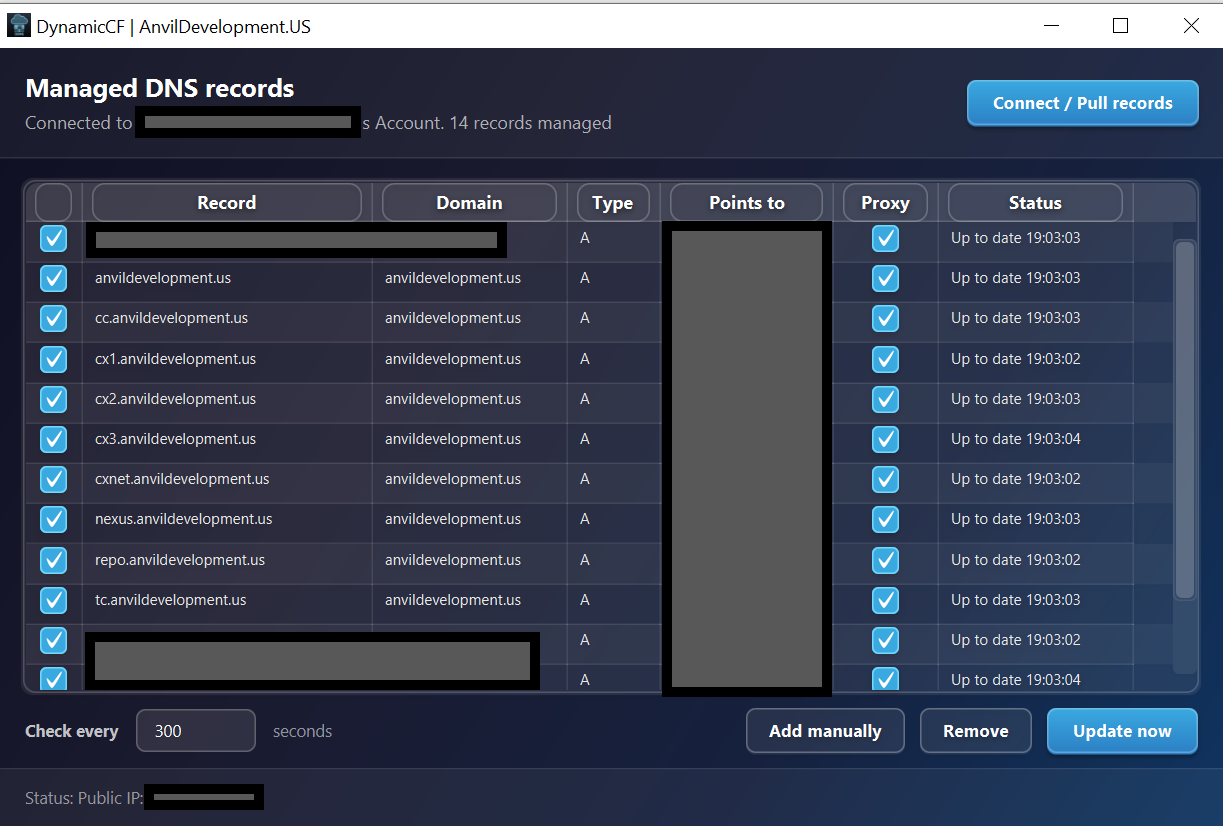
Version 2.0 replaces manual setup entirely. Instead of hunting down zone IDs and typing record names by hand, you connect a Cloudflare API token once and DynamicCF scans your account, shows you every A and AAAA record it found, and lets you tick the ones it should keep pointed at this machine. Records are managed from an editable table with per-record enable, proxy, and live status columns.
Currently available for Windows with native MSI installer. Built with Java for reliable performance and future cross-platform expansion.
New in 2.0: Guided Setup
Connect an account, pick your records, done. No zone IDs.
Setting up DynamicCF 1.x meant opening the Cloudflare dashboard, finding the zone ID for each domain, creating a token with the right scopes, and typing every record name in by hand. Version 2.0 replaces that with a four-step wizard that does the discovery for you.
What Changed in 2.0
Alongside onboarding, 2.0 fixes a class of bug that could quietly leave your origin IP exposed.
- FixedProxy status could silently drift off and stay off. The update cycle only ever compared the IP address, never the proxy state, so a record that had been unproxied would report "up to date" indefinitely while exposing the origin IP. The cycle now checks and re-asserts proxy status on every run, independent of whether the IP changed.
- FixedDashboard settings are no longer overwritten. An update rewrote the whole record with fixed TTL and proxy values, discarding anything you had configured for it in the Cloudflare dashboard. DynamicCF now changes only the fields it manages and leaves the rest of your record alone.
- FixedThe installed application no longer fails to start. A startup fault that only affected the packaged Windows build, not development runs, has been resolved.
- FixedThe wizard now opens for existing installs. Auto-launch required an empty site list, which excluded exactly the users who most needed to connect an account: anyone with pre-onboarding, per-site-key records.
- FixedRecords from earlier versions survive the upgrade. Records added before 2.0 could be silently dropped the first time the wizard ran. They are now recognised and carried over.
- FixedStale entries are cleaned up instead of failing forever. Leftover sites pointing at zones the token cannot see are now flagged and cleared during onboarding, rather than failing silently on every update cycle.
- FixedPublic IP lookup now uses HTTPS.
- NewIPv6 support. AAAA records can be managed alongside A records. The IPv6 lookup only runs when at least one managed record actually needs it.
- NewProxy status is a visible, editable column in both the wizard and the main table, defaulting to on. Your per-record choice is stored and enforced on every cycle.
- NewPer-record enable toggle, so a record can be paused without removing it.
- NewProxy checkbox in the manual Add record dialog, defaulting to on.
- ChangedMain window redesigned. An account and connection status bar above an editable table with enable, proxy, and status columns, replacing the flat record list.
- ChangedOne account-wide token by default. A per-record API key is now an optional override rather than a requirement.
Why DynamicCF
Every existing Cloudflare DDNS solution requires technical prerequisites that exclude non-technical users. DynamicCF was built to fill this gap.
Docker containers
Solutions like qdm12/ddns-updater, oznu/cloudflare-ddns, and favonia/cloudflare-ddns require Docker installed and configured, YAML config files, and command-line management. Inaccessible to most home users.
Router / firewall integrations
pfSense, OPNsense, UniFi, inadyn, and ddclient require specific network hardware or firmware. Standard home routers and Windows machines are unsupported without significant technical effort.
Script-based tools
PowerShell scripts and CLI updaters require manual execution, Task Scheduler setup, or admin privileges. No persistent GUI, no status feedback, no installation wizard.
Abandoned GUI tools
Existing Windows GUI attempts (e.g. CloudFlare-DDNS-Updater) are years unmaintained, use deprecated API versions, and require separate .NET Framework installation. No MSI packaging.
DynamicCF is the only native Windows desktop application for Cloudflare DDNS with a bundled MSI installer, requiring zero prior technical knowledge: no Docker, no router access, no scripts, no separate runtimes. Download, install, enter your API token, and your DNS stays current automatically.
Auto Updates
Monitors your public IP address and automatically updates Cloudflare DNS records at configurable intervals
Guided Onboarding
Connect a token, pick your domains, tick your records. No zone IDs to look up and no record names to type
IPv4 & IPv6
A and AAAA records both supported. IPv6 lookup only runs when a managed record actually needs it
Proxy Control
Per-record proxy status is visible, editable, and re-asserted every cycle so it cannot silently drift off
Privacy First
All debugging information collected locally only. No data transmission or cloud storage
Download DynamicCF
Windows-native installer with all dependencies included
DynamicCF
Native MSI installer for Windows with bundled Java 17+ runtime. No additional dependencies required. Automatically installs to AppData. Upgrading from 1.x keeps your existing records and runs the onboarding wizard once to connect an account.
License Agreement
Review the Anvil Development Software License Agreement before installation
By downloading this software, you agree to the Anvil Development Software License Agreement
System Requirements & Platform Support
Support & Resources
Get help with DynamicCF installation, configuration, and troubleshooting
Community Support
Join our Discord community for real-time support, feature discussions, and product updates.
Join DiscordTechnical Support
Contact our support team for product assistance, bug reports, and troubleshooting.
Email SupportBusiness Consulting
Custom development and enterprise solutions for your business needs.
Contact ConsultingSetup Instructions
-
Download and Install DynamicCF
- Download
DynamicCF-2.0.0.msifrom the link above. - Double-click the MSI file to start the installer.
- Follow the on-screen steps to complete installation (it will install to AppData by default).
- Launch DynamicCF from the Start Menu or desktop shortcut. On first run the setup wizard opens automatically.
- Download
-
Connect your Cloudflare account
- Click Create a token on Cloudflare. This opens the Cloudflare dashboard with a token template already filled in.
- Sign in, click Continue to summary, then Create Token, and paste the token back into DynamicCF.
- If the permissions are not pre-filled for any reason, set them by hand: Zone → DNS → Edit and Zone → Zone → Read.
-
Pick your domains
- Every zone the token can see is listed. Tick the domains you want scanned for records.
-
Choose records to manage
- Tick each A or AAAA record DynamicCF should keep pointed at this machine. Records already pointing here are pre-selected.
- Use the filter box, or the All, None, Matching this IP, and Proxy all buttons for bulk selection.
- Set proxy status per record in the Proxy column. It defaults to on.
-
Review and finish
- Check the summary of what will and will not be managed, set the check interval (default: 300 seconds), and click Finish.
-
Day-to-day use
- The main table shows every managed record with its type, target, proxy state, and last update time.
- Untick a record's enable box to pause it without removing it. Use Add manually for a record the scan did not cover, Remove to stop managing one, and Update now to force a refresh.
- Connect / Pull records re-runs the wizard to change account, domains, or record selection at any time.
- Report issues via Discord.
Notes
DynamicCF collects debugging information locally to help diagnose problems. This can make some operations slightly slower and will be optimized in future releases. Bug reports and feedback are welcome via Discord.
Ensure your DNS records are managed by Cloudflare. The account token needs Zone → DNS → Edit and Zone → Zone → Read; the second is what lets the wizard discover your domains and records. Tokens restricted to specific zones will only surface those domains. A per-record API key override is still available for anyone who needs it.
The application uses https://checkip.amazonaws.com to fetch your public IP. Ensure your network allows access to this service. IPv6 lookup runs only when at least one managed AAAA record requires it.